
Google Notifications

'Google Notifications' Panel Gets Filtering Options
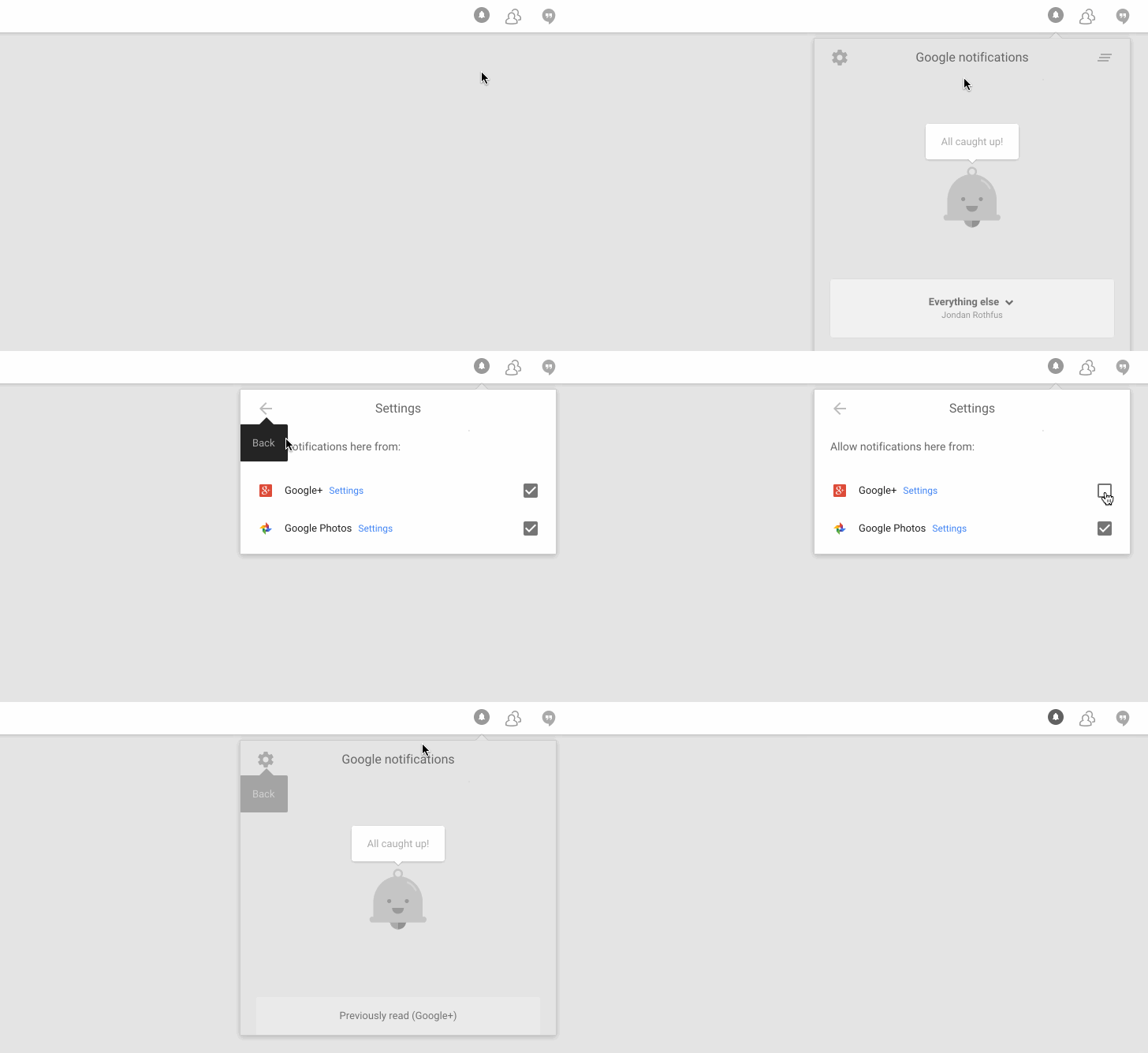

Before bits and pieces of Google+ departed from Google's web toolbar earlier this month, the bar's notification panel began labeling notifications according to their origin. G+ notifications for example got a Google+ icon, while notifications about a user's photo library got the Google Photos badge.
Tonight it looks like Google is rolling out another change to the panel, adding a settings button which allows users to filter out G+, Photos, or YouTube notifications individually.
Interestingly, not all sources appear for all users - it's unclear exactly how the panel knows which options to show, but it appears that the presence of Photos or YouTube options partially depends on whether you've opted to receive those notifications in the Google+ settings. Blogger is also included in the "Post" notification settings on Google+, but - to our knowledge - it hasn't made an appearance in the panel yet.
Whether, as some have speculated, Google plans to expand the "Google notifications" panel even further to include more of its web properties remains to be seen (fingers crossed), but this filtering mechanism would certainly make such an expansion a little easier to handle on the fly.

Stay connected for more latest updates...

Comments

Popular posts from this blog

Apple Drone

Here's what an Apple drone might look like Many major tech companies are eyeing drones — Amazon, Google and even Facebook. It's unclear at this point whether Apple wants in, too, but one designer has envisioned what the company's version of a drone might look like if it ever launched one. German designer Eric Huisman mocked up a sleek drone concept called the  Apple Quadcopter , which has a minimalistic black-and-white design. It's very, well,  Apple . In a series of photos posted to his  website , which are stylized to look like Apple's traditional promotional pictures, the company's iconic logo sits in the middle of a slightly curved body, an element that Huisman says will support its many built-in cameras. Similar to a typical quadcopter, the Apple drone has four rotors and four cameras that can shoot still and panoramic photos (up to 100MP). The concept, which was first spotted by  CNET , also incorporates 4K video functionality and built-...

Apple Car

Could This Be The Apple Car? There’s been plenty written about the potential Apple car. Now, though, we have an interesting guess as to what it might look like when it hits the road. This version is quintessentially Apple with smooth lines, tons of technology, and that iconic Apple logo prominently featured. These Apple car concepts were drawn up by  CarWow ,and they include both interior and exterior design possibilities. It starts by taking a cue from Tesla with an absentee grille and flowing, aerodynamic lines that look a bit like the Magic Mouse. Colors are white, black, and gold in a nod to the newest iPhones with carbon-fiber reinforced plastics that include a coating to keep dirt from marring that perfect finish. The wheels are designed to cut drag and look good. The interior is where it suddenly looks like no other car. There’s a fingerprint-reading home button on the driver and passenger front doors and it’s all unlocked from the outside with a left to rig...

Cool Down

Cool Down Your Android Phone With a Tap An overheating phone is bad news for your battery life, your palms and the internal components inside your device. Fortunately, there's an Android app that can help, shutting down some non-essential system tasks and background processes to give your handset the chance to cool off. You can choose from a one-tap quick fix or a more detailed manual mode. The app in question is  EaseUS Coolphone  and it offers several ways to wave a metaphorical fan in front of your phone's face. You can tap the quick cool button on the app's opening screen, via the app's one-button widget or from the app's entry in the notification drawer. After a few moments of scanning, you can choose to apply the changes suggest by the app. It will look for apps running in the background that don't necessarily have to be there, as well as settings that can be turned off to reduce the work your phone's doing. If you find these changes t...